One active timer
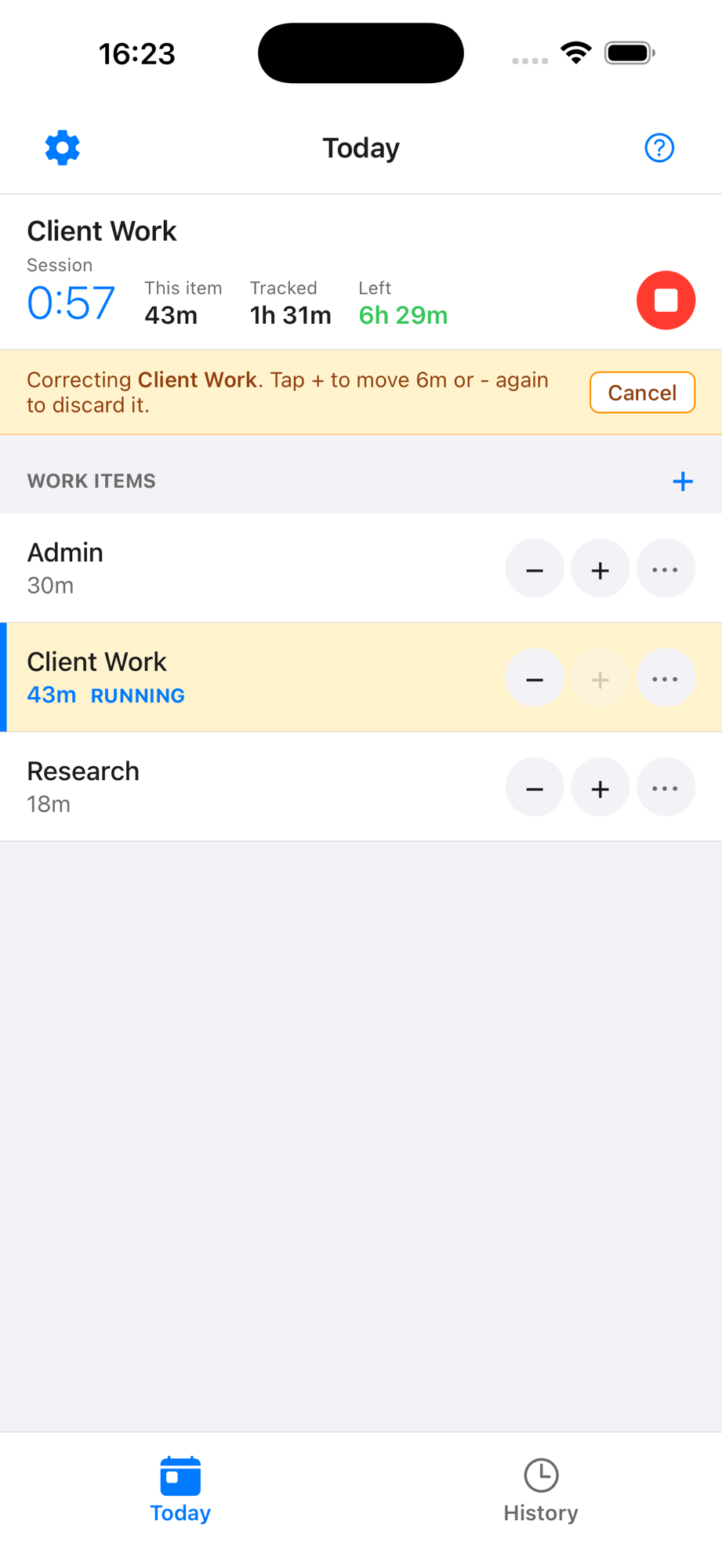
Tap a work item to start the timer. One timer runs at a time — and if you realize you switched later than you meant to, a Move button lets you pull time from the previous item into the current one.
TimeMender is a fast, forgiving personal worklog for iPhone, iPad, and iPhone Duo, for people who want a quick, honest record of what they worked on throughout the day — and a fast way to fix it when the day gets messy.
Useful over flashy. Clear over complicated.
Time help for imperfect workdays.
TimeMender is a fast, forgiving personal worklog app for people who want a quick, honest record of what they worked on throughout the day. Capture time by work item, fix missed or misbucketed time, and end the day knowing where your time actually went — whether you are feeding a timesheet or just keeping your own record.
A lot of time tools assume you will remember every start, every stop, and every switch. Real work does not happen that neatly. Meetings run long, interruptions happen, focus shifts, and timer habits break down.
Tap a work item to start the timer. One timer runs at a time — and if you realize you switched later than you meant to, a Move button lets you pull time from the previous item into the current one.
Add a configured increment when you forgot to start the timer or need to catch up after a meeting, call, or interruption.
Tap Adjust at the top of Today to enter correction mode. Tap a row to make it the source, then tap the add button on another row to move an increment there. Tap the remove button on any row to drop an increment without moving it.
Review yesterday's totals anytime. Full history, weekly summaries, and share/export are available with Pro.
On iPad and an opened iPhone Duo, Today stays on the left while All items, Adjust, and History open on the right. Wide Stage Manager windows get the same split view.
Pro keeps your work items, logged time, running timer, and settings the same on your iPhone and iPad through your own iCloud. Backup files stay free on every plan.
Rows, timers, and controls are labeled for VoiceOver, and layouts adapt to larger text sizes. Touch and hold a row for quick actions.
With Pro, the running timer shows as a Live Activity on the Lock Screen, in the Dynamic Island, and in StandBy, and Home Screen widgets keep today in view.
TimeMender is not trying to become payroll, billing, or project management software. It is a lightweight daily log for capturing what you worked on, so you can review your day clearly — whether that means filling in a timesheet or just knowing where your time went.
Add practical buckets like Meetings, Client Work, Project A, or whatever fits your projects, clients, and workflow.
Tap a row to start or switch the timer, with a clear tracked total and left or over summary for the day.
Quick-add forgotten time, move time between rows, or discard an over-tracked increment without leaving Today.
Use History to review yesterday's totals. Full history, summaries, and share/export are available with Pro.