See what is safe to use
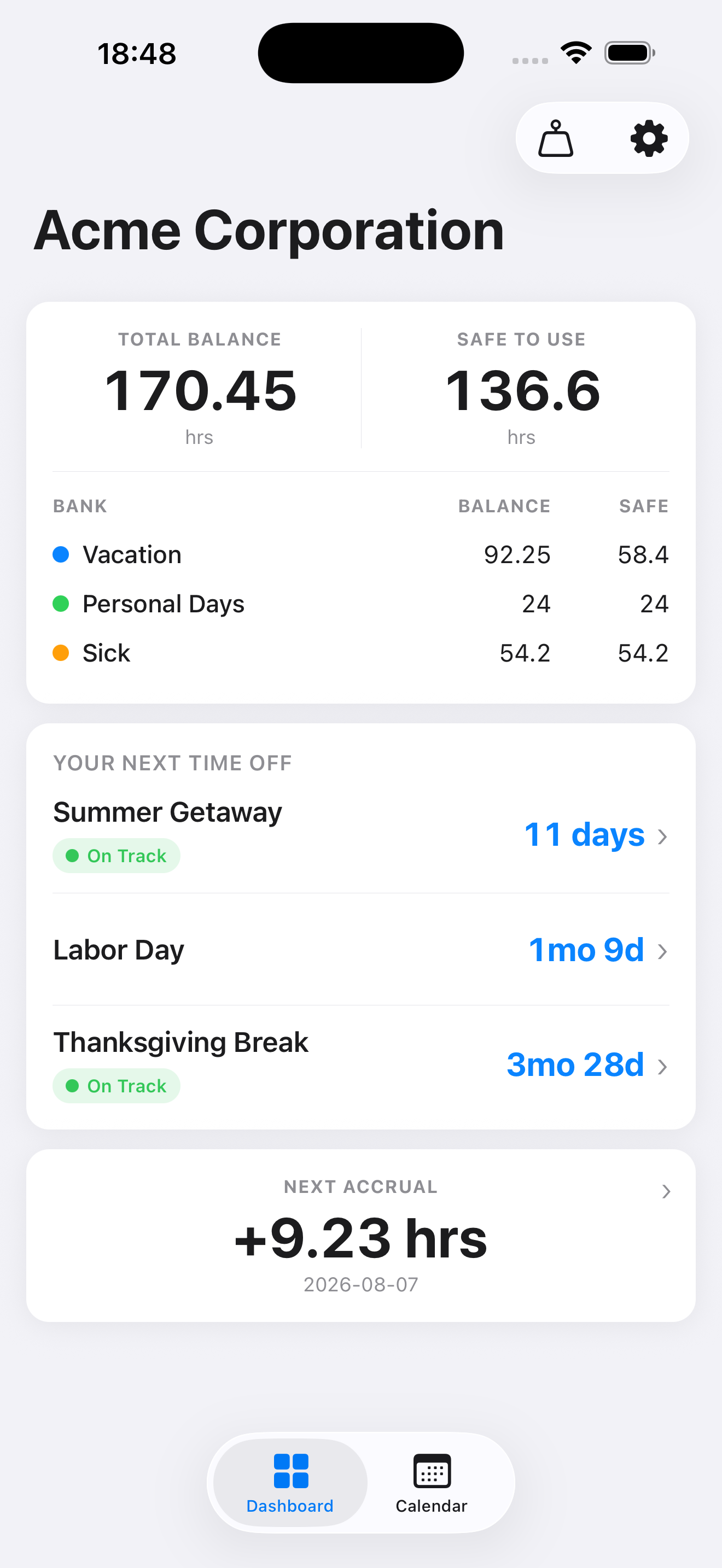
Balances update as you book time off and as new time accrues, so the number you see is the number you can actually take.
PTO Minder tracks your paid time off the way it actually accrues — across PTO, sick, and floating-holiday banks — and forecasts your balance forward, on your iPhone, iPad, and Apple Watch.
Useful over flashy. Clear over complicated.
Know exactly how much time off you can take.
PTO Minder tracks your paid time off the way it actually accrues — across PTO, sick, and floating-holiday banks — and forecasts your balance forward. See what is safe to use now, what is nearing a cap, and when your next accrual lands, without digging through an HR portal or a spreadsheet.
Most people find out too late that they were sitting on hours they could have used, or that a balance was about to hit a use-it-or-lose-it cap. PTO Minder keeps the real number in front of you, so you can plan time off with confidence.
Balances update as you book time off and as new time accrues, so the number you see is the number you can actually take.
Project your balance forward to any date. With Plus, caps and use-it-or-lose-it limits are flagged before you reach them.
PTO, sick time, and floating holidays each keep their own accrual rules. Free tracks one balance; Plus adds as many as you need.
Your data lives on your device. With Plus, iCloud sync keeps it current on your iPhone and iPad under your Apple ID — never a Brown’s Tech Co. account.
Most HR portals hand you a single balance and leave the rest to you — mentally adding up what you will accrue before your trip, subtracting what a cap or year-end rollover will take, and guessing what is actually safe to book. PTO Minder does that math for you.
PTO Minder is a planning tool, not an HR system: it doesn’t sign in to payroll or HR, and you still request time off through your employer’s usual process.
You already have a week booked in December. Can you take a long weekend in October too? Safe to Use already accounts for the December trip, so it tells you at a glance — without putting the big one at risk.
Hours that reset at year-end are counted out of Safe to Use and flagged weeks ahead, so you can book something instead of forfeiting them.
Book a trip and PTO Minder marks it On Track once you are projected to have enough — or warns you early if a cap or a slow accrual stretch would put it at risk.
With Plus, Home Screen and Lock Screen widgets — and the Apple Watch app and complications — keep the numbers in front of you without opening the app.
Pick a trip or time off and watch the days count down, right on your Home Screen, Lock Screen, or Apple Watch.
Put one bank’s balance on your Home Screen, or use Balance Breakdown to see every bank beside Safe to Use and your next time off. Time Off Summary shows the totals and what’s coming up.
Use-it-or-lose-it caps and expirations surface right on the widget, so a forfeiture never sneaks up on you.
VoiceOver works across the app, the widgets, and the Apple Watch app, and the calendar and pay-period grids grow with your text size.